
Table of Contents
Your business relies on your phone to close deals, manage clients, and track deliveries every single day. A dying battery can stall your operations, which is why learning how to check iphone battery cycle count on ios 18 is an essential skill to keep your daily workflow smooth. By checking this metric, you can easily predict when your device will need a replacement battery or a complete upgrade.
Most people only look at their battery health percentage. However, the cycle count gives you the true story of your phone’s age and wear. In this guide, we will show you exactly how to find this number on your device. We will also share simple tricks to help you get the most out of your hardware.
What is an iPhone Battery Cycle?
Before you learn how to check iphone battery cycle count on ios 18, you should understand what a cycle actually means. A battery charge cycle happens when you use 100% of your battery’s power. This does not have to happen all at once. For instance, you could use 50% of your battery today, charge it fully overnight, and then use 50% again tomorrow. That total usage equals one complete charge cycle.
Lithium-ion batteries slowly degrade over time. Every single cycle slightly reduces the amount of charge the battery can hold. If you use your phone heavily for business, you will rack up cycles much faster than a casual user. Tracking these cycles helps you plan your tech budget before your phone starts dying in the middle of a workday.
The Quick Way: How to Check iPhone Battery Cycle Count on iOS 18
Apple updated its settings menu to make tracking hardware much simpler. If you own a newer device, finding this data takes less than a minute. Knowing how to check iphone battery cycle count on ios 18 on modern devices is very straightforward.
Steps for iPhone 15 and iPhone 16 Series
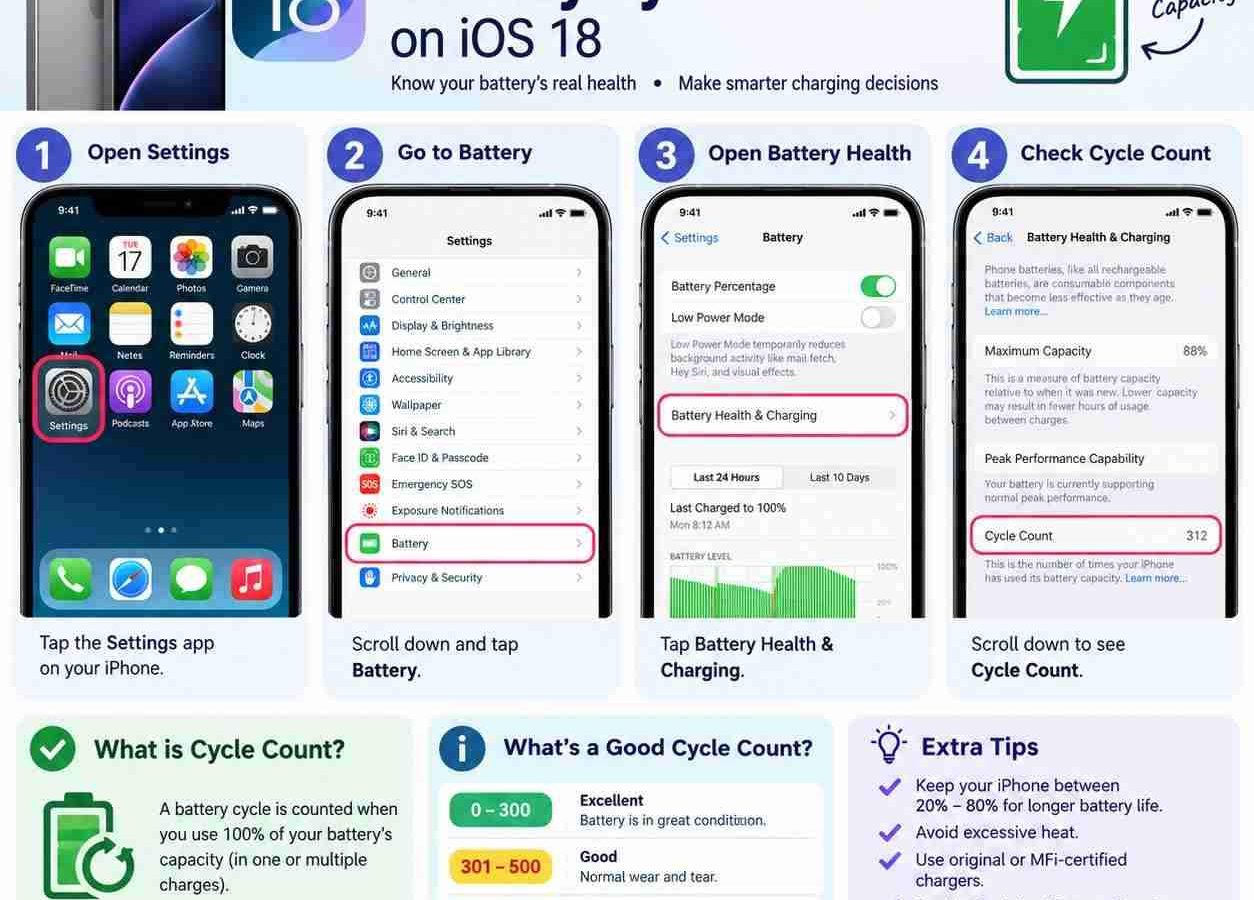
If you have an iPhone 15 or the newer iPhone 16 running iOS 18, Apple displays this data directly in your main battery settings. You do not need any special apps or workarounds. Follow these exact steps:
- Open the Settings app on your iPhone.
- Scroll down and tap on Battery.
- Tap on Battery Health & Charging.
- Look at the bottom of the screen to find the Cycle Count section.
Right next to the cycle count, you will also see the manufacture date of your battery and the date it was first used. This clean layout makes learning how to check iphone battery cycle count on ios 18 incredibly simple for modern device owners.
How to Check iPhone Battery Cycle Count on iOS 18 for Older Models
If you own an iPhone 14, iPhone 13, or older models, Apple does not show this number in the main battery menu. This is a common frustration for business owners who want to keep their older fleet of phones running. Do not worry, because you can still find this data. You just need to use your device’s built-in analytics logs.
Step 1: Enable iPhone Analytics
To use this method, your phone must actively save diagnostic data. If you have this turned off, you must turn it on and wait a day for the log file to generate.
- Open the Settings app.
- Scroll down and tap on Privacy & Security.
- Scroll to the very bottom and select Analytics & Improvements.
- Toggle on the switch that says Share iPhone Analytics.
Step 2: Find the Analytics Log
Once analytics sharing is active, your phone creates daily log files. Here is how to check iphone battery cycle count on ios 18 using those files:
- Under Analytics & Improvements, tap on Analytics Data.
- You will see a long list of text files sorted alphabetically.
- Scroll down to find files that start with the name Analytics- followed by the current date.
- Tap on the most recent file to open it.
Step 3: Extract the Cycle Count
These files contain thousands of lines of code. Do not let this intimidate you. You can easily find the exact data point you need by copying the text.
- Tap the Share icon in the top right corner of the screen.
- Select Save to Files or copy the entire text block to your clipboard.
- Open the built-in Notes app and paste the text into a new note.
- Tap the options button in Notes and select Find in Note.
- Type in the phrase last_value_CycleCount.
The number displayed directly below or next to this line is your current cycle count. This clever trick ensures that everyone can master how to check iphone battery cycle count on ios 18, even on older hardware.
Why This Matters for Your Small Business
As a business owner, you must manage your assets carefully. Phones are valuable business assets. If you buy used phones for your team, you must check their health. You do not want to hand an employee a phone that dies during a sales call. If you buy pre-owned devices, you can also read our guide on how to check original or clone phone in pakistan to protect your investment from scams.
According to research from Statista, mobile business operations have grown rapidly over the last decade. A single hardware failure can lead to lost revenue. If you use imported phones, you should also understand the difference between jv and factory unlock iphone pakistan before making bulk purchases for your sales staff.
Comparing Battery Cycle Lifespans
Different iPhone generations handle battery wear differently. Apple designs newer batteries to last significantly longer before they degrade. Here is a quick look at how battery health holds up across various models:
| iPhone Series | Expected Cycles to Reach 80% Health | Battery Class |
|---|---|---|
| iPhone 14 and Older | 500 Cycles | Standard Lithium-Ion |
| iPhone 15 Series | 1000 Cycles | Advanced Chemistry |
| iPhone 16 Series | 1000 Cycles | Advanced Chemistry |
As shown in the table above, newer models offer double the lifespan. If you are tracking hardware costs, knowing how to check iphone battery cycle count on ios 18 helps you decide if a phone is worth keeping or if it is time to sell it off.
Tips to Extend Your iPhone Battery Lifespan
Once you know how to check iphone battery cycle count on ios 18, you should take steps to keep that number from rising too quickly. Implement these easy rules for your team’s business devices:
- Enable Clean Energy Charging: This setting reduces carbon footprint and battery strain.
- Turn on Optimized Battery Charging: This limits the time your phone spends at 100% charge overnight.
- Avoid Extreme Temperatures: Never leave business phones on a hot car dashboard. Extreme heat permanently damages battery capacity.
- Use Original Chargers: Cheap, uncertified chargers can ruin battery health quickly. Only use official or certified chargers.
Taking care of your devices protects your bottom line. If you run an online business, you might also want to learn how to create verified paypal account in pakistan legal way to keep your business finances as healthy as your phone hardware.
For official support and detailed hardware specs, you can always visit the main Apple site to read about the latest battery technologies. Keeping your business tech optimized keeps your clients happy and your revenue growing.
Frequently Asked Questions
What is a good battery cycle count on iPhone?
For older models, a count under 500 is good. For iPhone 15 and 16 models, a count under 1000 is considered healthy. Once you cross these limits, your maximum capacity will likely drop below 80%.
Can I reset my iPhone battery cycle count on iOS 18?
No, you cannot reset this count. The cycle count is hardcoded into a microchip inside the battery itself. The only way to reset it is to get a genuine battery replacement from Apple.
Why does my battery capacity drop while my cycle count stays low?
Battery capacity depends on both cycle count and age. Even if you do not use the phone, chemical aging occurs. High heat exposure can also cause the capacity to drop faster than the cycle count rises.
Does fast charging increase the battery cycle count faster?
Fast charging does not directly increase the cycle count, but it generates more heat. This excess heat can degrade your battery faster over time. Try using a standard charger when charging overnight.
Last updated: September 19, 2026
Written by Bilawal Qureshi (Software Developer and AI Expert).
Have questions or ready to get started? Get in touch with our team or chat with us on WhatsApp.